How it works

Describe the machine. Get the most likely cause. No chatbot.

A walkthrough of one incident, start to finish — how Upstrix guides the repair, captures what worked, and makes the next diagnosis sharper.

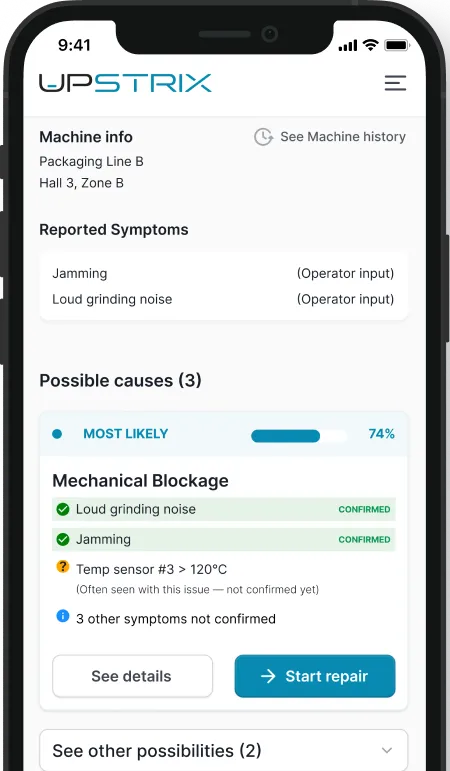
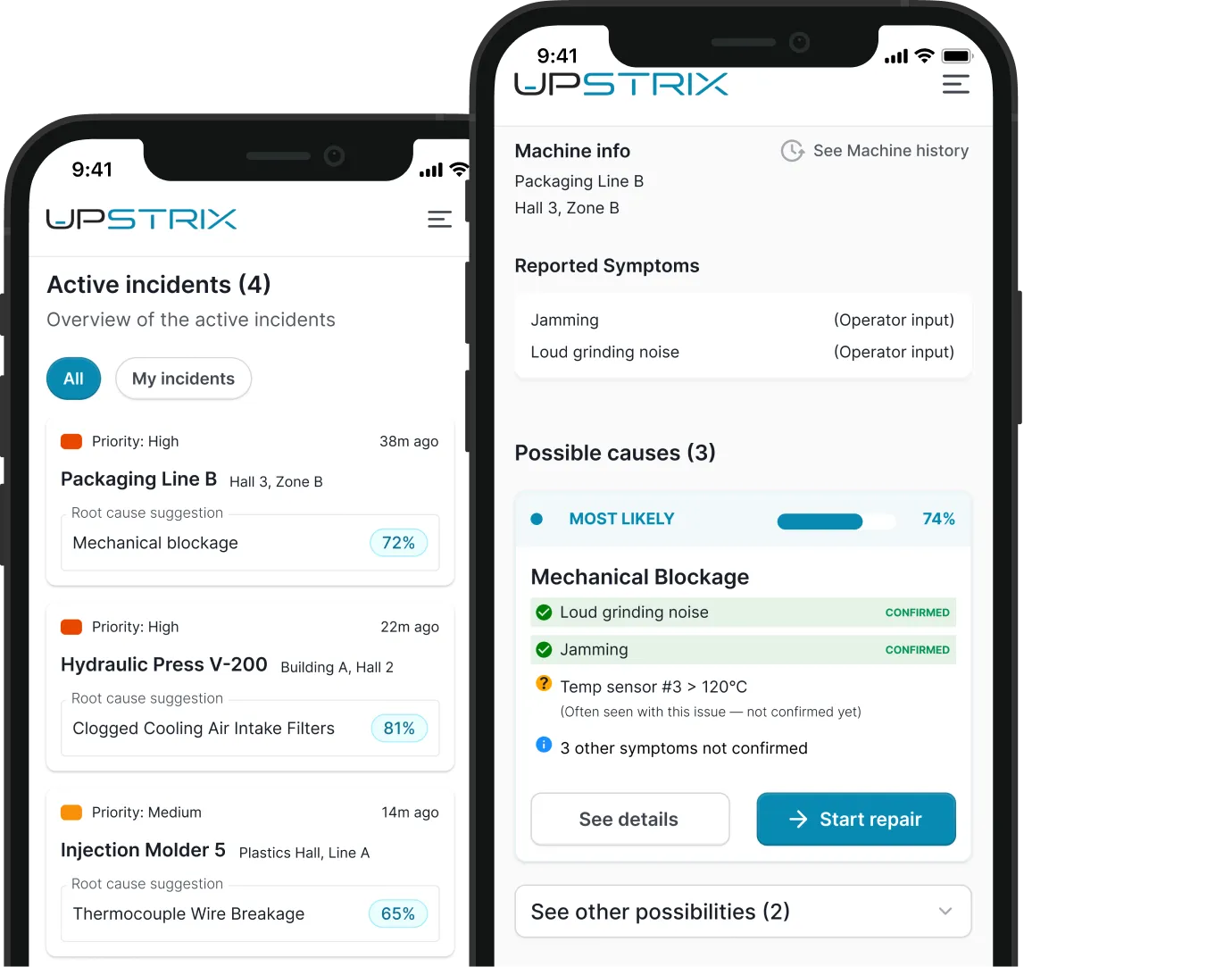
Upstrix mobile incident overview screens

What's inside Upstrix

Three components, each with one job.

None of them asks your technician to find the right words.

DIAGNOSIS ENGINE

Describe what you see. The system does the rest.

No chatting. Describe what you see — a statistical model computes the most likely causes, with the evidence behind each one.

  • Describe what you observe — the model updates in real time
  • Every percentage traces back to confirmed symptoms
  • No generated text reaches the shop floor
  • Same symptoms in, same output every time
KNOWLEDGE DATABASE

Your team's knowledge. Structured and searchable.

Not a folder of PDFs. A structured model of your equipment — machine types, named root causes, symptoms with diagnostic weights, repair steps reviewed and approved by your seniors.

  • Machines organized by type and location
  • Root causes with symptom weights and occurrence rates
  • Repair steps with photos, diagrams, and senior voice notes
  • Nothing published without a senior's approval

AI ASSISTANTS

Talk like you would to a colleague. It works.

LLMs handle messy human input well — normalizing voice and free text into structured observations. They don't decide what's wrong. The statistical model does that.

  • Symptom extraction from voice and free text
  • Knowledge Assistant turns a voice note into a reviewable diff
  • Every AI output approved by a human before going live

Why it gets better over time

Each repair makes the next one faster and more accurate.

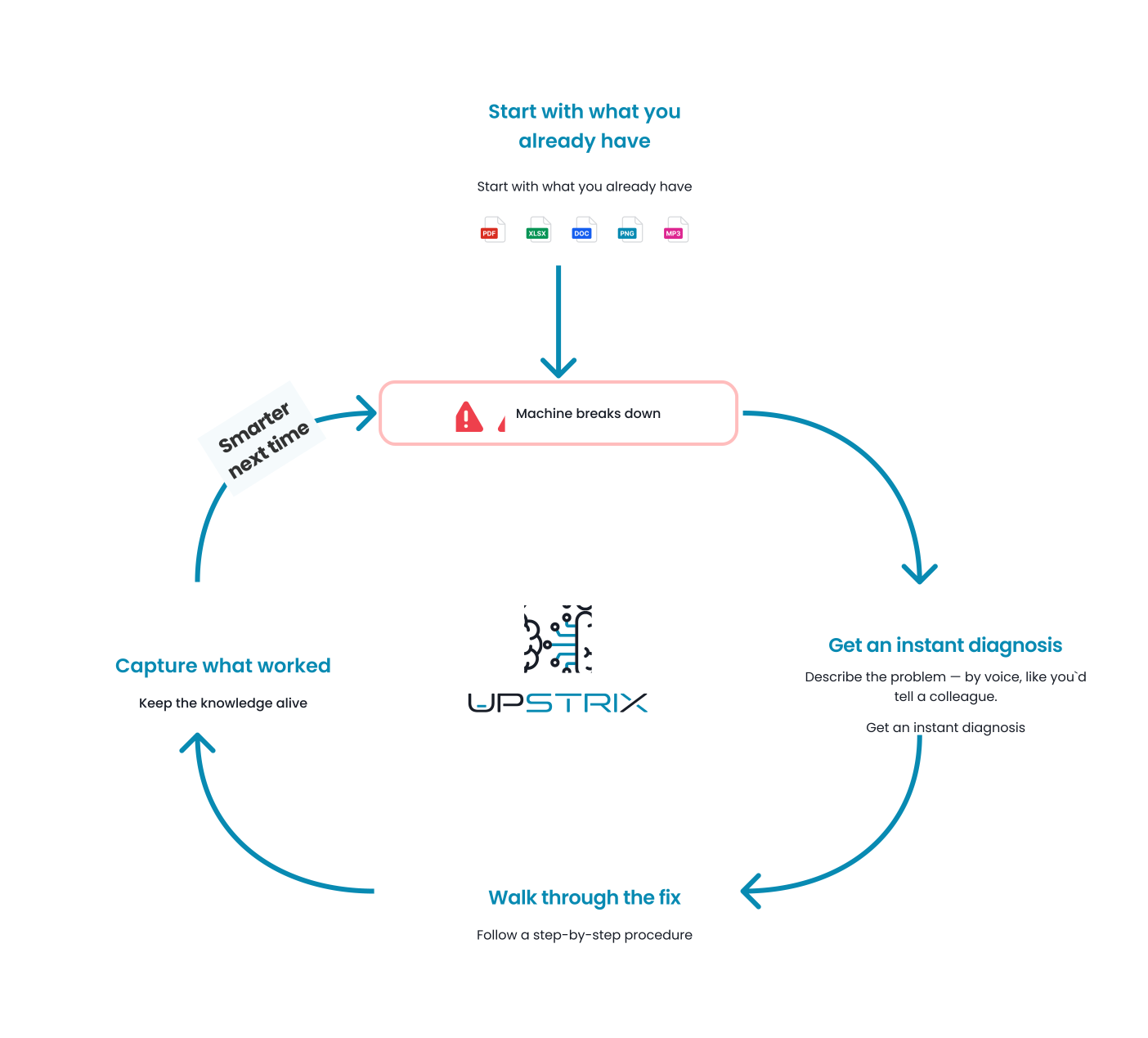
One initial setup, then a cycle that runs on every incident.

Month one, it reflects your documents. Month six, it reflects six months of actual repairs on your machines — reviewed, structured, and immediately available to whoever opens the next incident on that equipment.

A self-learning maintenance loop from initial setup through diagnosis, repair, capture, and smarter future incidents

Initial setup

Day one isn't a blank page.

Upload whatever you have — OEM manuals, maintenance logs, technician notes, Excel cookbooks. Upstrix drafts the initial knowledge structure: candidate machines, root causes, symptoms, repair steps. Your seniors review and correct.

Ready for real incidents within days. No CMMS connector, no telemetry, no IT project required.

MAKE THE SYSTEM ALIVE, DAY ONE

PDF

OEM manuals

Spec sheets, procedures

XLSX

Maintenance logs

Past incidents, fixes, preventive schedules

DOC

Internal guides

How your team actually does it

PNG

Photos & Diagrams

Of your machines, your line, your setup

MP3

Voice notes

What your experts already explained out loud

Productive in days. Not months.

Most maintenance AI projects stall because they require sensor installations or ERP integrations before any technician sees value. Upstrix works from uploaded documents and human-reported symptoms alone. Integrations come later — as upgrades, not prerequisites.

See the incident

The technician arrives. The system is already working.

Before the technician touches the machine, Upstrix has already identified the most likely causes — from what the operator reported, the machine's history, and every previous incident on that equipment type.

THE MACHINE AND ITS HISTORY

Is this the third time this month?

One tap shows full incident history for this machine and its type. Recurring failures are visible immediately — and the cause ranking already reflects the pattern.

WHAT'S ALREADY BEEN REPORTED

Who said what — and from where.

Every symptom is tagged by source: operator on the line, technician input, or machine telemetry when connected. The technician sees the situation as it actually arrived.

THE MOST LIKELY CAUSES

Not a suggestion. A computed result with evidence.

Each cause shows a likelihood percentage and the specific symptoms behind it — confirmed, conflicting, or unverified. The technician sees not just what the system thinks, but exactly why.

Upstrix mobile incident overview and diagnosis screens

Sharpen the diagnosis

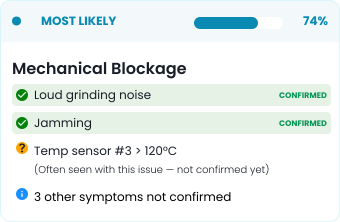
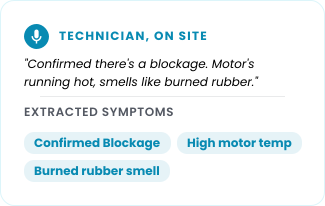
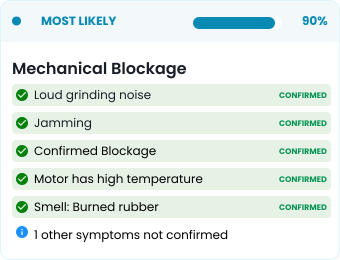
Describe what you observe. The model recalculates.

The technician speaks or types freely. The system extracts each distinct observation, maps it to known symptoms, and recomputes the most likely causes on the spot.

When uncertainty is high, Upstrix asks targeted yes/no questions to narrow the field. Each answer updates the result in real time.

Diagnosis card before technician input
Technician voice note with extracted symptoms
74% 90%
Diagnosis card after technician input

Repair guidance, built by your team

Proven procedures. Consistent repairs.

Every procedure in Upstrix has been reviewed and approved by a senior on your team. Not generated from a manual. Authored, verified, and attached to the exact root cause it belongs to.

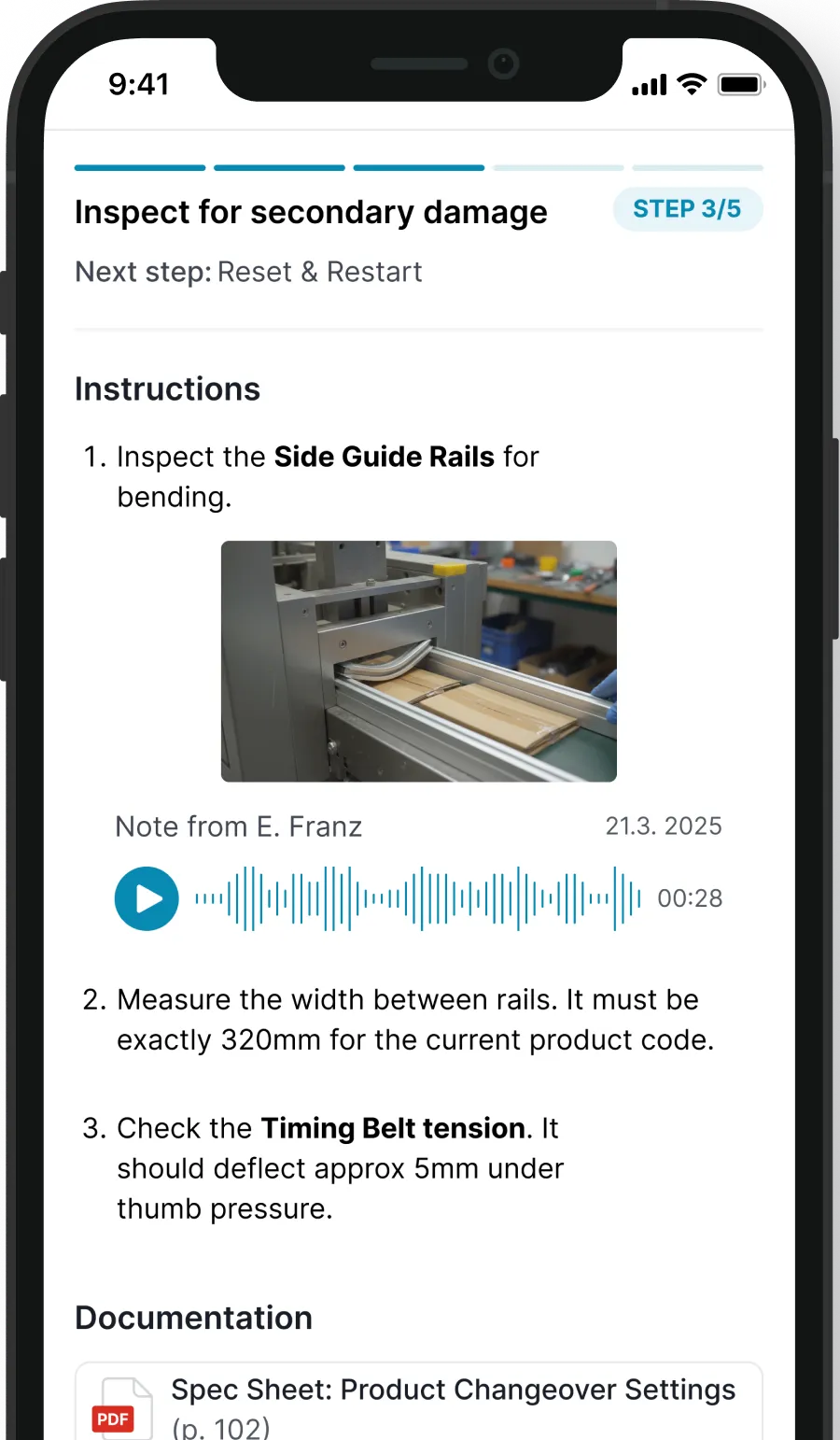
Upstrix repair guidance screen showing step-by-step maintenance instructions

WHERE YOU ARE IN THE REPAIR

Never start from scratch mid-repair.

Previous step, current step, next step — always visible. If the repair changes hands, the next technician picks up exactly where the previous one stopped.

INSTRUCTIONS THAT MATCH YOUR MACHINES

The way your team actually does it.

Photos from your line, voice notes from your seniors with name and date, links to the right page of the right manual. Not a generic procedure — the way your team actually does it.

WHEN THE STEP DOESN'T WORK

Dead end? The system adapts.

The technician flags the step, describes what they're seeing, and the model determines whether this is a mis-ranked cause or a new failure mode. Escalation carries the full activity history — the next person doesn't start from zero.

Capture what worked

The fix is done. The knowledge stays.

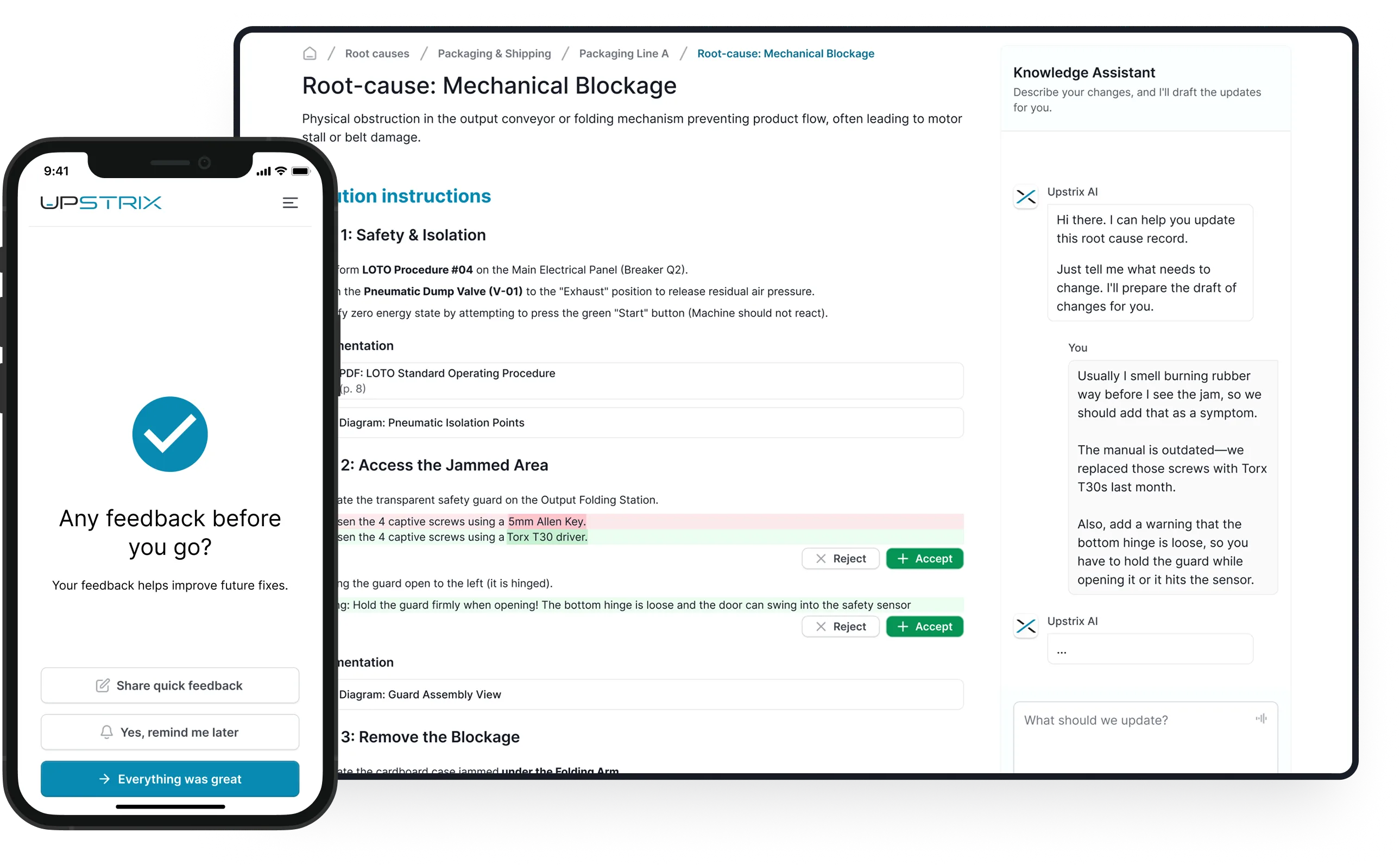
After confirming the fix, the technician gets one prompt: anything worth adding? A 10-second voice note is enough. Seniors review every proposal before it goes live. Nothing reaches the knowledge base without approval.

KNOWLEDGE ASSISTANT — EXAMPLE

Senior says (30 seconds):
"For Line A use a Torx T30, not the 5mm Allen key. And before you remove the blockage, rotate the shaft a quarter turn backwards — otherwise the bearing seizes."

Upstrix proposes:
→ Replace "5mm Allen key" with "Torx T30 driver" in Step 2
→ Add warning to Step 3: "Rotate shaft quarter-turn before removal to prevent bearing seizure"

Senior clicks Accept. Live in 10 seconds.

Upstrix knowledge capture and senior review screens for approving technician updates

Learning loop

Every fix leaves something behind.

Two ways the team gets better.

WHEN A NEW SYMPTOM IS ADDED

The next diagnosis starts sharper.

The system learns the new signal. Next time it appears on this machine type, it counts toward the most likely causes from the start — for every technician.

WHEN A REPAIR STEP IS UPDATED

One source of truth. Always current.

When a senior approves a change, it propagates immediately. Every technician who opens that root cause from now on sees the updated version.

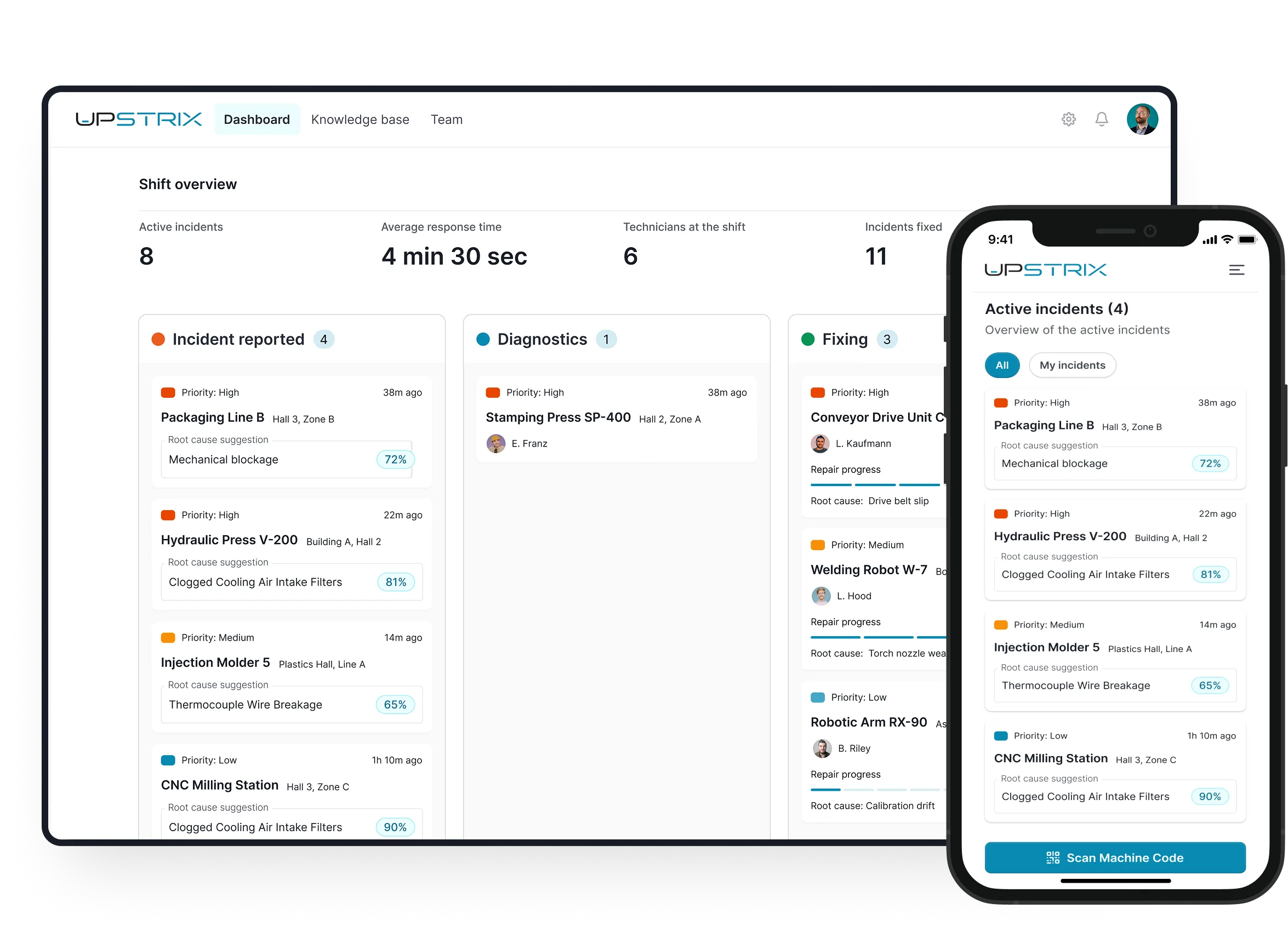
The shift, at a glance

All incidents. All technicians. One view.

The coordinator sees active incidents, who is assigned, and what step they're at. The maintenance manager sees the same data in summary — across shifts, across days.

When something escalates, the full incident history travels with it. Decisions are made on evidence.

Upstrix shift overview dashboard showing active incidents across mobile and desktop

Why we built it this way

Three decisions that make Upstrix different from every maintenance chatbot.

01

A broken machine is not the moment to chat.

Most maintenance AI puts a chatbot between the technician and the answer. We think that's the wrong design for someone standing next to a broken machine. So we removed the conversation entirely.

02

Works from day one. Gets better every day after.

Most maintenance AI projects stall waiting for sensor installations and ERP integrations. We decided no technician should have to wait for IT before seeing value.

03

Sits where your other systems don't.

Your ERP tracks costs. Your CMMS tracks work orders. Neither tells a technician what is most likely wrong with Line 3 at 2AM.

Ready to shape the future of maintenance?

We're selecting 3-5 manufacturing companies as Design Partners. You shape the product. You use it free, forever.

Not ready to commit? Join the waitlist — we'll reach out when the next cohort opens.